Get your storage back.
Keep every memory.
Doppelgone finds the duplicate and lookalike photos filling up your Google Photos, iCloud, computer or phone, keeps the best shot of each and clears the rest.
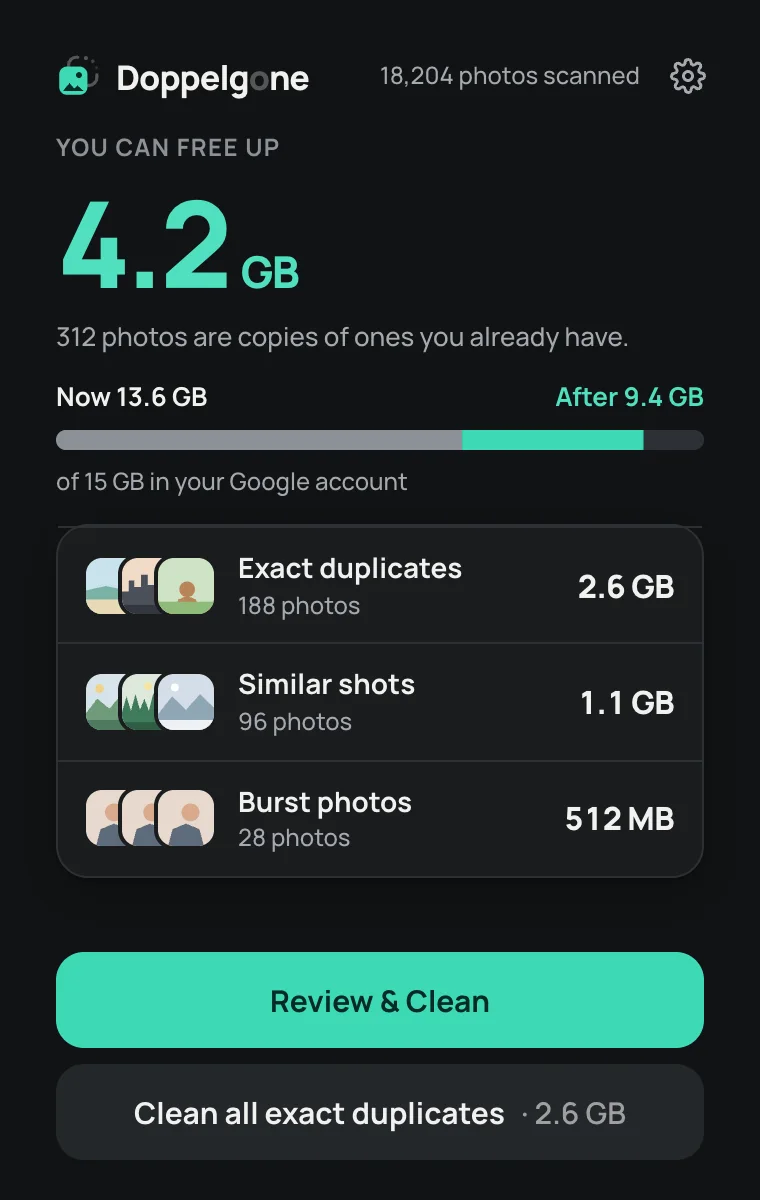
312 photos are copies of ones you already have.
The same engine for your company’s SharePoint and OneDrive.
Identical files, old versions and near-identical documents across Microsoft 365. A free, read-only audit shows how much space comes back.
Watch it find the doubles.
Scan, review, clean up, and where the removed photos wait: the whole flow in 80 seconds, in Google Photos and iCloud, on a PC or Mac, and on a phone.
See it on the one you'll use.
The same engine and the same rules everywhere: the best shot of every set stays, you approve each clean-up, and everything can be put back for 30 days.
Chrome extension
Open photos.google.com or icloud.com in Chrome, click the Doppelgone icon and scan. The whole library is analysed in your browser, on your own computer. Close the popup any time: the scan keeps going.
- Works with Google Photos and iCloud Photos. Switch accounts in Settings; Pro covers up to 3.
- Removed photos wait in Google Photos' trash or iCloud's Recently Deleted for 30 days, with one-click Undo.
- Apple doesn't count Recently Deleted, so iCloud storage drops straight away. Google frees the space once its trash is emptied, after 30 days or when you empty it.
Chrome on Windows, Mac, Linux or ChromeOS. Free from the Chrome Web Store.
Windows app
Pick the folders and drives that hold your photos: camera imports, old phone backups, the Pictures folder, an external drive. Doppelgone scans them on the PC itself, iPhone HEIC files included. Files that are only in OneDrive are skipped, so nothing is downloaded.
- Removed photos move to a Removed folder next to your photos, then to the Recycle Bin after 30 days. Undo any clean-up with one click.
- Exact copies, retakes and bursts, with the best shot kept in every set.
- One Pro licence covers this PC together with your Google Photos or iCloud accounts.
Windows 10 and 11, from the Microsoft Store.

Mac app
Scan your Apple Photos library, your folders or an external drive, on the Mac itself. Nothing is uploaded. iPhone HEIC files are read as they are.
- From Apple Photos, removed photos go to Recently Deleted for 30 days, and leave your other devices too when iCloud Photos is on.
- From folders, they move to a Removed folder next to your photos, then to the Trash after 30 days, with one-click Undo.
- Signed and notarised with Apple. Downloads straight from doppelgone.app.
macOS 14 Sonoma or newer. Builds for Apple silicon and Intel Macs.

iPhone app
The photos on the phone itself: camera bursts, retakes, the same picture saved from a chat twice, and everything iCloud Photos keeps on the iPhone. Every photo is analysed on the phone. Nothing is uploaded.
- Removed photos go to Recently Deleted in Photos for 30 days, on all your devices when iCloud Photos is on.
- iOS asks you to confirm before anything moves. Favourites, Live Photos and videos are never touched.
- Pro is one in-app purchase on the App Store. No subscription.
iOS 17 or newer, from the App Store.

Android app
The photos on the phone: camera bursts, pictures saved from chats, downloads and the copies in your albums. Every photo is analysed on the phone. Nothing is uploaded.
- Removed photos go to your phone's Trash for 30 days. Undo puts a whole clean-up back in one tap.
- Android asks you to allow the move before anything happens. Favourites and videos are never touched.
- Pro is one purchase on Google Play, and the same licence covers your computer and cloud libraries too (up to 3).
Android 11 or newer, from Google Play.

Doppelgone looks through your Google Photos or iCloud Photos library in Chrome, or the photos on your PC, Mac or phone, and spots exact copies, retakes and bursts. Nothing is changed.
In every set it keeps the photo where eyes are open, faces are sharp and the light is right. Tap any photo to keep it too.
Only what you approve moves to your library’s own trash (Google Photos’ trash, Recently Deleted, your phone’s trash or a Removed folder on your computer), where it stays for 30 days, so anything can go back.
Tap a photo to keep it too.
Scan your whole library, see every duplicate and how much space you'd get back, and clean up 200 photos (in total, across your accounts).
Unlimited clean-ups on up to 3 libraries (Google Photos and iCloud accounts, your computers and Android phones; Pro bought in the iPhone app covers that iPhone) (yours and your family's). AI checks every group for the best shot. No subscription.
See pricingNo. Doppelgone analyses your photos on your own device: in Chrome, on your PC or Mac, or on your phone. To pick the best shot, only short text notes about each set of similar photos (such as “sharpest” or “eyes closed”) go to our server, with a one-way code for your account instead of your email. Never pictures, names, places or dates.
Yes. Everything goes to your library’s own trash first (Google Photos’ trash, Recently Deleted in iCloud or Apple Photos, your Android phone’s trash, or a Removed folder next to your photos on a computer) and stays there for 30 days. Undo a whole clean-up from Doppelgone, or restore single photos where they wait. With iCloud, Apple only restores photos while your iCloud storage isn’t full.
iCloud: straight away, because Apple doesn’t count Recently Deleted toward your storage. Google Photos: once its trash is emptied, which happens automatically after 30 days, or you can empty it yourself once you’re happy.
Favourites, photos with descriptions or captions, motion and Live Photos, videos, hidden photos and anything shared with you by someone else. Screenshots and edited photos are never suggested for removal, and sets it is less sure about are marked “Your call”, so you can check them before cleaning.
No. Doppelgone is an independent product that works with Google Photos and iCloud Photos in your browser, and with the photos on your own computer and phone. Google Photos is a trademark of Google LLC; iCloud is a trademark of Apple Inc.
Go by where the photos are. Google Photos or iCloud Photos: the Chrome extension. Folders and drives on a computer (or Apple Photos on a Mac): the Windows or Mac app. The photos on a phone: the iPhone or Android app. One Pro licence covers up to 3 libraries across Chrome, your computers and Android; Pro bought in the iPhone app covers that iPhone.